

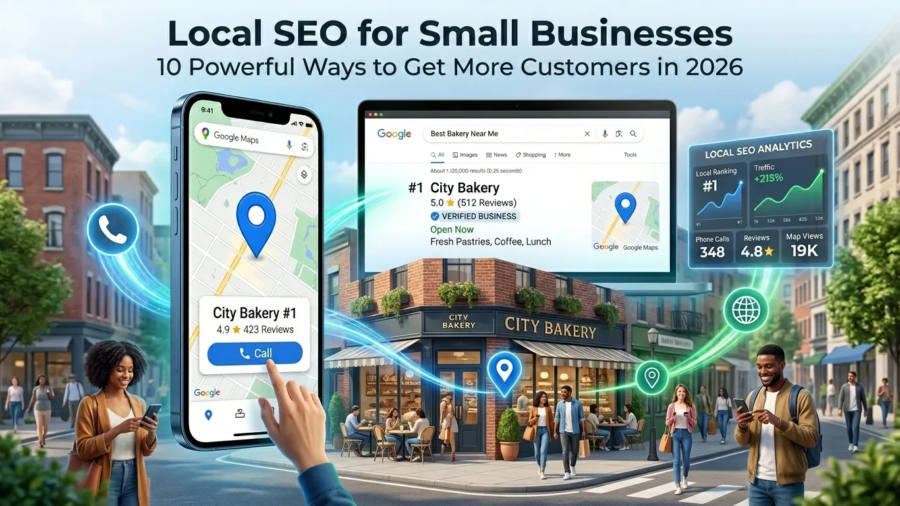
Local SEO for Small Businesses: 10 Powerful Ways to Get More Customers in 2026

Local SEO for Small Businesses: 10 Powerful Ways to Get More Customers in 2026

Introduction

Local SEO for small businesses has become one of the most effective ways to attract customers in 2026. Whether you run a service business, retail store, consulting company, or professional practice, people are searching online for businesses near them every day.

When someone searches for terms like:

  • website designer near me
  • SEO consultant near me
  • coffee shop near me
  • plumber near me

Google prioritizes businesses with strong local SEO signals.

The challenge is that many small businesses either ignore local SEO or implement it incorrectly. As a result, competitors appear higher in search results and capture more customers.

This guide explains 10 powerful local SEO strategies that can help your business improve visibility, attract more local customers, and generate more leads.

local SEO for small businesses

Why Local SEO Matters in 2026

Consumer behavior continues to shift toward local search.

Before contacting a business, many customers now:

  • Search Google
  • Read reviews
  • Check Google Maps
  • Visit websites
  • Compare competitors

If your business is not visible in local search results, potential customers may never discover your services.

Strong local SEO helps:

  • Increase visibility
  • Build trust
  • Generate qualified leads
  • Improve website traffic
  • Attract nearby customers

Optimize Your Google Business Profile

Your Google Business Profile is one of the most important local SEO assets.

An optimized profile can help your business appear in:

  • Google Search
  • Google Maps
  • Local Pack results

Make sure your profile includes:

  • Accurate business name
  • Phone number
  • Website
  • Business category
  • Services
  • Business description

Businesses with complete profiles often perform better in local searches

You can create and manage your business listing through Google Business Profile to improve your visibility in Google Search and Google Maps.

Google Business Profile optimization

Use Consistent Business Information Everywhere

Google wants consistent information across the internet.

Your:

  • Business name
  • Address
  • Phone number

should match everywhere your business is listed.

Inconsistent information can confuse both users and search engines.

Check:

  • Business directories
  • Social media profiles
  • Review websites
  • Local listings

Consistency strengthens local SEO signals.

Target Local Keywords

One of the most effective local SEO strategies is targeting location-based keywords.

Examples:

  • website designer in Yaoundé
  • SEO consultant in Cameroon
  • local SEO services in Nigeria
  • WordPress developer in Douala

These keywords help Google understand where your business operates.

Include local keywords naturally in:

  • Page titles
  • Headings
  • Service pages
  • Meta descriptions
  • Blog content

Create Location-Specific Service Pages

Many businesses make the mistake of creating one generic services page.

Instead, consider creating dedicated pages for important locations.

Examples:

  • SEO Services in Yaoundé
  • Website Design Services in Douala
  • SEO Consultant in Cameroon

Location pages help improve visibility for geographically relevant searches.

Create Location-Specific Service Pages

Many businesses make the mistake of creating one generic services page.

Instead, consider creating dedicated pages for important locations.

Examples:

  • SEO Services in Yaoundé
  • Website Design Services in Douala
  • SEO Consultant in Cameroon

Location pages help improve visibility for geographically relevant searches.

Collect More Customer Reviews

Reviews are a major ranking factor for local SEO.

Positive reviews help:

  • Build trust
  • Improve visibility
  • Increase conversions

Encourage satisfied clients to leave reviews on your Google Business Profile.

The more genuine reviews your business receives, the stronger your local presence can become.

customer reviews for local SEO

Optimize Your Website for Mobile Users

Most local searches now happen on mobile devices.

A mobile-friendly website should:

  • Load quickly
  • Display correctly on all devices
  • Have readable text
  • Offer easy navigation

Poor mobile experiences often lead to higher bounce rates and lost opportunities.

You can test your website’s performance using Google PageSpeed Insights to identify speed and usability issues that may affect rankings and conversions.

For additional optimization tips, read:

On-Page SEO Checklist for 2026: 10 Powerful Steps to Improve Rankings


Create Helpful Local Content

Content remains an important part of local SEO.

Examples include:

  • Local industry guides
  • Community updates
  • Local business tips
  • Regional case studies

Useful local content can help attract both visitors and backlinks.

It also signals relevance to search engines.

Google’s recommendations for creating helpful, people-first content can be found in Google Search Central Documentation.

Build Local Citations

Local citations are mentions of your business online.

Examples include:

  • Business directories
  • Industry directories
  • Chamber of commerce websites
  • Local associations

Quality citations strengthen local trust and authority.

Focus on reputable directories rather than quantity.

Improve Website User Experience

Even the best local SEO strategy can fail if visitors dislike your website.

Focus on:

  • Clear navigation
  • Fast load times
  • Strong calls-to-action
  • Professional design
  • Easy contact options

Many businesses lose customers because visitors leave before taking action.

Research from Nielsen Norman Group consistently shows that user experience has a significant impact on engagement and website performance.

For more insights, read:

7 Critical Reasons Visitors Leave Your Website Without Taking Action in 2026

Build Local Authority and Trust

Google wants to recommend trustworthy businesses.

Authority can be strengthened through:

  • Customer reviews
  • Backlinks
  • Partnerships
  • Industry recognition
  • Quality content

Trust is increasingly important for both search rankings and conversions.

Businesses with strong authority signals often outperform competitors.

Backlinks remain an important ranking factor, and resources from Moz Beginner’s Guide to SEO can help businesses understand how authority influences search visibility.


Local SEO for Small Businesses: Key Takeaways

Local SEO for small businesses is one of the most valuable marketing investments you can make in 2026.

The businesses that succeed locally are often those that:

  • Optimize their Google Business Profile
  • Collect reviews
  • Target local keywords
  • Build citations
  • Create useful content
  • Improve user experience

Implementing these strategies can help your business attract more local customers and improve visibility in Google Search and Google Maps.

Conclusion

Local SEO continues to be one of the most effective ways for small businesses to grow online.

Unlike broad marketing campaigns, local SEO targets people who are actively searching for products or services in a specific area.

By applying the strategies discussed in this guide, your business can improve visibility, generate more leads, and compete more effectively in local search results.

Small improvements made consistently often produce significant long-term results.

Need Help Improving Your Local SEO?

If you want to improve your local rankings, optimize your website, or attract more customers through search engines, professional guidance can make a significant difference.

At Ngulefac Digital, I help businesses improve SEO performance, strengthen their online presence, and create websites designed to generate leads.

Contact me today for a free consultation and discover how local SEO can help your business grow.

Frequently Asked Questions

What is local SEO?

Local SEO is the process of optimizing your online presence so your business appears in local search results and Google Maps.

Why is local SEO important for small businesses?

Local SEO helps businesses attract nearby customers who are actively searching for products or services.

Does Google Business Profile help SEO?

Yes. An optimized Google Business Profile can significantly improve local visibility and help businesses appear in Google Maps and local search results.

How long does local SEO take?

Many businesses begin seeing improvements within a few months, although results depend on competition, optimization quality, and consistency.

Why Visitors Leave Your Website Without Taking Action. 7 Critical Reasons in 2026

Why Visitors Leave Your Website Without Taking Action. 7 Critical Reasons in 2026

Introduction

Why visitors leave your website without taking action is one of the biggest challenges businesses face in 2026. Many business owners invest time and money into building a website, creating content, and driving traffic, only to discover that visitors are leaving without contacting them, requesting a quote, or making a purchase.

The truth is that getting traffic is only part of the equation. If your website fails to engage visitors, build trust, and guide them toward a clear action, you will continue losing potential customers. Understanding why visitors leave your website without taking action can help you identify weaknesses in your website and improve your conversion rates.

In this guide, we’ll explore seven critical reasons visitors abandon websites and what you can do to keep them engaged.

why visitors leave your website without taking action

Why Website Conversions Matter More Than Ever in 2026

Businesses today face more competition online than ever before. Users have countless options available, and their expectations continue to rise.

Modern visitors expect:

  • Fast-loading pages
  • Clear messaging
  • Professional design
  • Mobile-friendly experiences
  • Easy navigation
  • Instant trust signals

If your website fails to meet these expectations, visitors often leave within seconds.

Many businesses focus heavily on traffic but ignore conversion optimization. As a result, they attract visitors but struggle to generate leads or sales.

1. Your Value Proposition Is Not Clear

One of the most common reasons visitors leave a website is confusion.

When someone lands on your homepage, they should immediately understand:

  • What you do
  • Who you help
  • Why they should choose you

Many websites use vague headlines and generic marketing language that fail to communicate their value.

Examples of weak headlines:

  • “Welcome to Our Website”
  • “We Build Digital Experiences”
  • “Innovative Solutions for Modern Businesses”

These statements sound impressive but tell visitors very little.

A strong headline clearly communicates your offer and target audience.

For example:

“Professional WordPress Websites That Help Small Businesses Get More Clients.”

This instantly explains what you do and who you help.

clear website headline example

2. Your Website Loads Too Slowly

Website speed has a direct impact on user experience and conversions.

Studies consistently show that visitors are more likely to abandon slow websites.

Common causes of slow websites include:

  • Large image files
  • Poor hosting
  • Too many plugins
  • Unoptimized code
  • Excessive animations

A slow website can negatively affect:

  • User engagement
  • Search engine rankings
  • Conversion rates

To improve performance:

  • Compress images
  • Use quality hosting
  • Enable caching
  • Remove unnecessary plugins
  • Optimize scripts and files

You can test your website speed using Google PageSpeed Insights.

3.Your Navigation Is Confusing

Visitors should never have to guess where to click next.

Poor navigation creates frustration and causes users to leave.

Common navigation mistakes include:

  • Too many menu items
  • Unclear labels
  • Cluttered layouts
  • Hidden important pages

Your navigation should help visitors quickly find:

  • Services
  • Pricing
  • Portfolio
  • Contact information
  • About page

The easier it is to navigate your website, the longer visitors are likely to stay.

Your Website Looks Outdated

First impressions matter.

Visitors often judge a business based on the appearance of its website.

An outdated website can make a business appear:

  • Unprofessional
  • Untrustworthy
  • Inactive
  • Behind competitors

Signs of an outdated website include:

  • Old design styles
  • Poor typography
  • Low-quality images
  • Inconsistent branding
  • Non-responsive layouts

Modern websites should focus on:

  • Clean layouts
  • Professional visuals
  • Strong branding
  • Mobile responsiveness
  • User-friendly design
outdated business website design example

5. Your Calls-To-Action Are Weak or Missing

Visitors need clear direction.

A call-to-action (CTA) tells users what to do next.

Without strong CTAs, visitors may leave even if they are interested in your services.

Weak CTA examples:

  • Learn More
  • Click Here
  • Read More

Stronger CTA examples:

  • Request a Free Consultation
  • Get a Website Audit
  • Book a Discovery Call
  • Start Your Project Today

Effective CTAs should be:

  • Visible
  • Clear
  • Action-oriented
  • Relevant to visitor intent

Every important page should contain at least one strong CTA.

6. Your Content Does Not Match Visitor Intent

Another reason why visitors leave your website without taking action is that the content fails to address their needs.

Visitors arrive with specific questions and expectations.

If your content does not provide relevant answers, they will quickly leave.

Examples include:

  • Attracting the wrong audience
  • Targeting irrelevant keywords
  • Providing shallow information
  • Ignoring customer pain points

Before creating content, understand your audience’s goals and challenges.

For more guidance, read:

How to Identify Your Target Audience in 2026: 9 Powerful Strategies for Business Growth

When content aligns with visitor intent, engagement and conversions typically improve.

7. There Are No Trust Signals

Trust is a major factor in conversion decisions.

Visitors want evidence that your business is credible and capable of delivering results.

Trust signals include:

  • Client testimonials
  • Case studies
  • Portfolio examples
  • Reviews
  • Certifications
  • Professional branding

Without trust signals, visitors may hesitate to contact you.

Adding social proof can significantly improve conversion rates.

website trust signals and testimonials

Why Visitors Leave Your Website Without Taking Action: Key Takeaways

Understanding why visitors leave your website without taking action is essential if you want to generate more leads and customers online.

The most common reasons include:

  • Unclear messaging
  • Slow loading speeds
  • Confusing navigation
  • Outdated design
  • Weak calls-to-action
  • Poor content alignment
  • Lack of trust signals

Addressing these issues can improve user experience and help convert more visitors into paying customers.

How to Improve Website Conversions in 2026

Use this quick checklist:

  • Clarify your value proposition
  • Improve page speed
  • Simplify navigation
  • Modernize website design
  • Strengthen CTAs
  • Create audience-focused content
  • Add testimonials and case studies
  • Optimize for mobile users
  • Improve SEO strategy

For more website optimization tips, read:

How to Build a Website That Gets Clients (and Avoid Common Mistakes 2026)

7 Critical Reasons Why Your Website Is Not Getting Traffic (And How to Fix It Fast in 2026)

Conclusion

Many businesses focus heavily on attracting traffic but overlook what happens after visitors arrive.

The reality is that website success depends on both traffic and conversions.

By understanding why visitors leave your website without taking action and fixing the issues discussed in this guide, you can improve engagement, increase trust, and generate more leads from your website.

Small improvements often lead to significant long-term results.

Frequently Asked Questions

Why do visitors leave websites quickly?

Visitors often leave due to slow loading speeds, poor design, confusing navigation, unclear messaging, or lack of trust.

Does website design affect conversions?

Yes. Website design strongly influences trust, user experience, and whether visitors take action.

How can I reduce my website bounce rate?

Improve website speed, create better content, simplify navigation, and add stronger calls-to-action.

Why is my website getting traffic but no leads?

This often happens when the website attracts the wrong audience or fails to guide visitors toward a conversion action.

Ready to Turn More Website Visitors Into Customers?

If your website is getting traffic but not generating leads, the problem may not be your marketing—it may be your website experience.

I help businesses create high-performing websites that are designed to build trust, improve conversions, and attract more clients.

Whether you need:

  • A new website
  • A website redesign
  • SEO improvements
  • Conversion optimization

I’m here to help.

Contact me today for a free website review and discover what’s preventing visitors from taking action.

On-Page SEO Checklist for 2026 10 Powerful Steps to Improve Rankings

On-Page SEO Checklist for 2026: 10 Powerful Steps to Improve Rankings

Introduction

On-page SEO checklist strategies are essential if you want your website to rank higher on Google in 2026.

Many websites struggle to get traffic because their pages are not properly optimized for search engines or AI-driven search systems.

If you follow a strong on-page SEO checklist, you can improve rankings, increase visibility, and create content that performs better across both Google and AI search platforms.

on-page SEO checklist optimization dashboard illustration

What Is On-Page SEO?

On-page SEO is the process of optimizing individual website pages to improve search engine rankings and user experience.

Why On-Page SEO Matters in 2026

SEO is evolving rapidly. Today, websites are optimized not only for Google but also for AI-powered search systems like ChatGPT and Google Gemini.

On-Page SEO Checklist for 2026 (Complete Guide)

1. Use Your Focus Keyword Properly

Your focus keyword should appear naturally throughout your content, including titles, meta descriptions, and subheadings.

2. Optimize Your SEO Title

Your SEO title is one of the strongest ranking signals. Include your keyword and a number to improve click-through rates.

3. Write a Strong Meta Description

Meta descriptions help users understand your content before clicking. Keep them clear and direct.

4. Use Proper Headings Structure

Good structure improves readability for both users and AI systems. Use one H1, followed by H2s and H3s.

5. Optimize Images for SEO

Compress image sizes and add descriptive ALT text to improve speed and accessibility.

6. Improve Internal Linking

Internal linking helps connect your content together and improves website structure.

External links to trusted sources like Moz improve credibility.

8. Improve Website Speed

A slow website reduces performance. Use quality hosting and compress images to stay fast.

9. Optimize for Mobile Devices

Most users browse on mobile. Ensure your site adapts to all screen sizes.

10. Create Helpful, Human-Focused Content

Prioritize helpful content that answers real questions and solves real problems.

How AI Is Changing On-Page SEO

AI search systems are changing discovery. Use conversational language and structured answers to stay relevant.

Common On-Page SEO Mistakes

Avoid keyword stuffing, slow speeds, and poor mobile experiences to maintain high rankings.

Final Thoughts

A strong on-page SEO checklist is your foundation for long-term growth in 2026.

Need Help Optimizing Your Website for SEO?

Contact me for professional SEO strategy and content optimization.

FAQ

What is on-page SEO?

On-page SEO refers to optimizing website pages to improve rankings and user experience.

SEO for beginners

SEO for Beginners: Why Most Websites Fail to Rank (2026 Guide)

Introduction

If you have a website but you’re not getting traffic, the problem is most likely SEO. Many beginners struggle because SEO seems technical and complicated. But in reality, the basics are simple when broken down correctly. This guide will show you exactly how to approach SEO for beginners step by step, even if you have no prior experience.

By the end, you’ll understand how to:

  • Get your website visible on Google
  • Attract the right audience
  • Turn traffic into potential clients
SEO ranking website on Google

What is SEO and Why It Matters

SEO (Search Engine Optimization) is the process of improving your website so it appears on search engines like Google. When someone searches for a service or solution, SEO helps your website show up in the results.

Without SEO:

  • Your website stays invisible
  • You get little to no traffic
  • You miss potential clients

With SEO:

  • You attract organic traffic
  • You reach people actively searching
  • You grow your business consistently

If you want your site to succeed, you need both SEO and a solid structure. Here’s how to build a website that gets clients

How Search Engines Work

Search engines like Google scan and index websites to decide which pages to show for each query.

They focus on three main things:

  • Relevance (does your content match the search?)
  • Quality (is your content helpful?)
  • Authority (do other sites trust you?)

Understanding this helps you create content that ranks.

Step 1 – Keyword Research

Keyword research is the foundation of SEO.

It helps you understand what people are searching for.

Instead of guessing, you target real search terms like:

  • “SEO for beginners”
  • “how to rank on Google”

Tools you can use:

  • Google search suggestions
  • Keyword tools
  • Competitor analysis

Focus on long-tail keywords. They are easier to rank for and bring targeted traffic.

keyword research SEO example

Step 2 – On-Page SEO

On-page SEO is about optimizing your content.

Key elements include:

  • Title (must include your keyword)
  • Meta description
  • Headings (H1, H2, H3)
  • Keyword placement
  • Internal linking

Make sure your keyword appears:

  • In the first paragraph
  • In at least one subheading
  • Naturally throughout the content

Read More why your website is not getting traffic

Step 3 – Content Creation

Content is what drives SEO.

You need to create useful, relevant, and clear content that answers user questions.

Focus on:

  • Solving real problems
  • Writing clearly and simply
  • Providing value

Long-form content (like this guide) tends to perform better because it covers topics in depth.

Step 4 – Technical SEO Basics

Technical SEO ensures your website works properly.

Important areas:

  • Fast loading speed
  • Mobile responsiveness
  • Secure website (HTTPS) You get these with good hosting services like Hostinger
  • Clean URL structure

If your site is slow or broken, it won’t rank well.

Backlinks are links from other websites to yours.

Backlinks are one of the strongest signals search engines use to determine how trustworthy and authoritative your website is. When other websites link to your content, it tells search engines that your site provides value and can be relied on. However, it’s not just about quantity the quality of those links matters even more. A few links from reputable sites can have a bigger impact than many from low-quality sources.

They act as a signal of trust.

The more quality backlinks you have, the more authority your site gains.

Ways to get backlinks:

Guest posting

For SEO for beginners, guest posting is one of the easiest ways to start building backlinks. It involves writing articles for other websites or blogs in your industry, and in return, you usually get a link back to your site. This helps you reach a new audience, build credibility, and earn high-quality backlinks from trusted platforms.

Sharing valuable content

A key principle of SEO for beginners is creating valuable content that others want to share. When you publish useful guides, case studies, or unique insights, other websites are more likely to link to your content naturally. The more helpful and relevant your content is, the stronger your chances of gaining organic backlinks.

Networking

Another important strategy in SEO for beginners is networking. This means building relationships with other creators, business owners, or professionals in your industry. By connecting and collaborating, you increase your chances of getting mentioned or linked to on their websites, which helps grow your site’s authority over time.

SEO for Beginners: Why Most Websites Fail to Rank (2026 Guide) Common SEO Mistakes

Avoid these mistakes:

  • Keyword stuffing
  • Ignoring mobile optimization
  • Publishing low-quality content
  • Not using internal links
  • Expecting instant results

SEO takes time, but consistency brings results.

Final Thoughts

SEO is not complicated when you break it down.

Focus on:

  • Keywords
  • Content
  • Optimization
  • Consistency

If you apply these steps, your website will start gaining visibility and traffic.

Need Help With SEO?

If you want help optimizing your website and getting traffic:

I can help you with:

  • SEO strategy
  • Keyword research
  • Website optimization

Contact me to get started.